Choosing between WPBakery and Elementor can be tricky for affiliate marketers building WordPress landing pages and niche sites.
WPBakery
Elementor
We spent weeks testing both drag-and-drop page builders side by side. From design flexibility to page load speed and long-term cost, we broke down every detail. In 2026, both tools have added AI features, fresh templates and better performance settings.
But only one can be the right pick for your affiliate marketing website. Read on to find out which WordPress page builder plugin truly wins on performance, design and value for money.
Quick Overview: WPBakery and Elementor at a Glance
Before we jump into each section, here is a quick snapshot of both tools based on our hands-on testing.
| Feature | Elementor | WPBakery |
|---|---|---|
| Active Websites | 21M+ | 5.8M+ |
| Free Version | Yes (32 widgets) | Free trial only |
| Paid Pricing | From $60/year | From $82 lifetime |
| Editor Type | Frontend visual editor | Frontend + Backend editor |
| Pro Widgets/Elements | 85+ | 50+ |
| AI Assistant | Paid (One plan) | Free with active support |
| Theme Compatibility | Most themes | Any WordPress theme |
| WooCommerce Support | Yes (paid plans) | Yes |
| Licence Model | Annual subscription | Lifetime (one-time payment) |
| Template Library | 300+ templates | 80+ predefined layouts |
Ease of Use: Which Page Builder Is Simpler to Learn? 🖱️
We installed both plugins on a fresh WordPress site and got to work straight away.
Elementor loads a live visual drag-and-drop editor on the frontend. You click, drag a widget, and see changes in real time. It feels smooth and modern, much like Figma for WordPress.
WPBakery offers two editing modes. You get a Backend Editor with a grid layout and a Frontend Editor for inline visual editing. For someone who just wants to update text or swap an image, the backend grid view is fast and simple.
However, Elementor has a steeper learning curve if you are not a designer. The sheer number of options can feel overwhelming at first. WPBakery keeps things minimal. You pick a row, add columns and drop in content blocks. It is hard to break the layout.
For affiliate marketers who just want to publish content fast, WPBakery feels quicker out of the box.
But if you want total creative control and pixel-perfect designs, Elementor is worth learning.
🏆 Winner: WPBakery — Easier for non-designers and content-first affiliate marketers who need speed over style.
Design Flexibility: Elementor vs WPBakery Creative Freedom
Design is where Elementor truly shines. We tested both builders on product review pages and landing pages for affiliate campaigns.
Elementor Pro gives you 85+ widgets, a Theme Builder, Popup Builder, motion effects, CSS transforms, masks, scroll snap and page transitions.
You can customise every pixel. Margins, padding, colours, fonts, hover effects — all editable from a single sidebar panel.
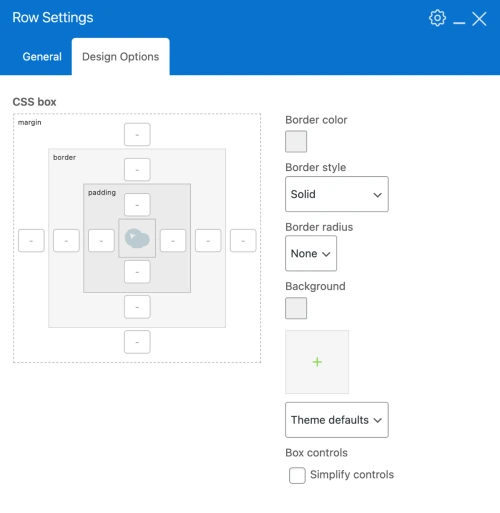
WPBakery offers 50+ content elements, a Skin Builder and an Advanced Grid Builder with 40+ predefined styles. You can build solid pages. But design options feel limited compared to Elementor’s toolkit.
We noticed WPBakery relies on a structured 12-column grid model. It keeps layouts clean but restricts creative freedom. Elementor’s freeform layout system allows you to place elements anywhere. Great for unique affiliate landing page designs.
If you build high-converting sales pages or review pages with custom layouts, Elementor gives you far more creative ammunition.
🏆 Winner: Elementor — Unmatched design flexibility for affiliate marketers who want visually rich pages.
Page Load Speed and Performance: Real Numbers Compared 📊
Page speed matters for SEO rankings and affiliate conversion rates. We tested both builders using Google PageSpeed Insights and GTmetrix.
Here is what independent tests from WP Rocket revealed on mobile performance:
| Metric (Mobile) | Elementor | WPBakery |
|---|---|---|
| PageSpeed Score | 81/100 | 79/100 |
| Total Load Time | 3.4s | 3.6s |
| First Contentful Paint | 2.5s | 2.8s |
| Largest Contentful Paint | 4.2s | 3.5s |
| Cumulative Layout Shift | 0 | 0.52 |
| Speed Index | 3.5s | 5.0s |
| Total Blocking Time | 0 ms | 30 ms |
| Total Page Size | 979 KB | 983 KB |
Elementor scores better on Core Web Vitals metrics like CLS (0 vs 0.52) and Speed Index (3.5s vs 5s).
WPBakery edges ahead on Largest Contentful Paint at 3.5s versus 4.2s for Elementor.
Both builders produce similar page sizes (around 980 KB) and comparable HTTP requests (22–23).
WPBakery’s own community tests (WPBuildersFightClub) show different results: GTmetrix scores of 99/95 for WPBakery versus 92/96 for Elementor on desktop.
The truth is, both need optimisation. Pair either builder with a caching plugin like WP Rocket, and scores jump to 100/100 on mobile for both.
Elementor uses a module-based system with dynamic script loading. WPBakery uses shortcodes, which can slow rendering on complex pages.
🏆 Winner: Elementor — Better Core Web Vitals scores and built-in performance optimisation tools give it the edge.
Template Library: Which Builder Saves You More Time? ⏱️
Templates save hours when building affiliate review sites and product pages. We compared both libraries head to head.

Elementor offers 300+ professionally designed templates, plus hundreds of individual page and block templates. Quality is high. Most templates look modern, responsive and ready for affiliate content.

WPBakery provides 80+ predefined layouts and templates through an online Template Library that gets regular updates. Templates are functional but feel dated compared to Elementor’s polished offerings.
Elementor also supports Cloud Templates (up to 50,000 on higher plans), making it easy to save and reuse your own custom layouts across multiple sites.
💡 Maven Recommendation: If you run multiple affiliate websites, Elementor’s Cloud Templates and reusable Global Widgets help maintain brand consistency across all sites without rebuilding every time.
🏆 Winner: Elementor — Larger, more modern template library with superior reuse features for affiliate site builders.
AI Features: WPBakery AI vs Elementor AI Assistant 🤖
AI is the big update in 2026 for both builders. We tested AI features on both platforms for writing product descriptions, generating layouts and creating code snippets.

WPBakery AI comes free with an active support tenure. You input your specifications, and it generates content and code. It is straightforward. No extra cost. No credits to worry about.
Elementor’s AI tools are bundled with the One plan (from $19/month). Features include AI-generated code, copy, images and layouts. Elementor also offers an AI Site Planner that can create a complete sitemap and wireframe in under 20 minutes.
For affiliate marketers who need AI content generation for bulk product pages, Elementor’s AI is more powerful. But WPBakery wins on value since AI access is included at no extra charge.
🏆 Winner: WPBakery — Free AI access with no credit limits makes it the smarter pick for budget-conscious affiliate marketers.
SEO Features: Which Builder Ranks Better on Google? 🔍
Both builders claim strong search engine optimization support. We tested how each handles on-page SEO.

Elementor offers clean HTML output, schema markup support, built-in lazy loading, image optimisation (WebP/AVIF conversion) and Element Caching. It is compatible with all major WordPress SEO plugins like Yoast and Rank Math.
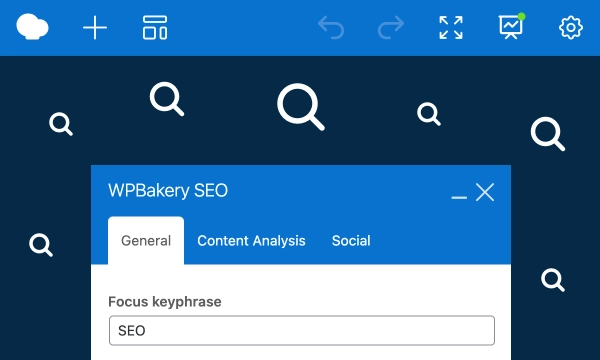
WPBakery includes a built-in SEO optimisation toolkit and is fully compatible with Yoast SEO and WPML for multilingual sites. However, WPBakery’s shortcode-heavy output can create messy code that search engines may find harder to crawl.
Elementor’s built-in performance and accessibility tools — like the accessibility scanner and bulk image optimisation — give it a clear advantage for technical SEO.
For affiliate SEO strategies, cleaner code output means faster indexing and better rankings.
💡 Maven Recommendation: Pair Elementor with Rank Math or Yoast SEO for maximum on-page optimisation. Use Elementor’s built-in image optimiser to improve page speed for better rankings.
🏆 Winner: Elementor — Cleaner code output and built-in optimisation tools make it the stronger choice for SEO-focused affiliate sites.
WooCommerce and eCommerce Integration 🛒
Many affiliate marketers also run eCommerce stores alongside review sites. We tested WooCommerce compatibility on both builders.
Elementor Pro includes a dedicated WooCommerce Builder, WooCommerce Dynamic Tags, Stripe and PayPal integration. You can design custom product pages, cart pages and checkout flows without touching code.
WPBakery supports WooCommerce but lacks a dedicated WooCommerce builder. You can display products and create layouts, but customisation is limited.
If you promote affiliate products through a WordPress eCommerce site, Elementor’s WooCommerce integration is far more refined.
🏆 Winner: Elementor — Dedicated WooCommerce Builder and payment integrations make it the better choice for affiliate stores.
Pricing and Value for Money: Lifetime vs Annual Subscription 💰
Pricing is where WPBakery dominates. Here is a full breakdown.
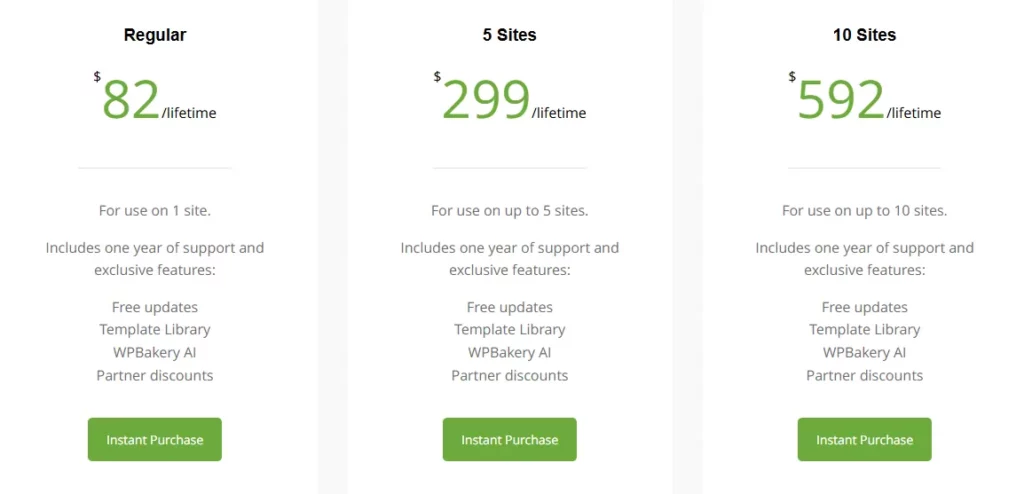
WPBakery Pricing (Lifetime — One-Time Payment):
Elementor Pro Pricing (Annual Subscription):
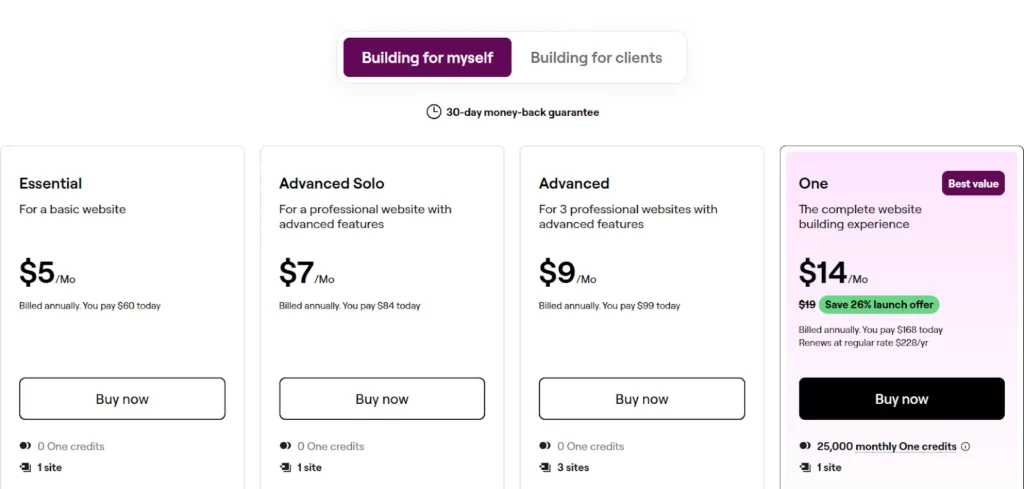
The maths is simple. WPBakery costs $69 once. Elementor costs $59 every single year.
After two years, you have already spent $118 on Elementor versus $69 total on WPBakery.
For affiliate marketers managing multiple niche sites on a tight budget, WPBakery’s lifetime licence is a massive saving. Elementor’s free version is useful for basic sites but locks critical features like the Popup Builder, custom CSS and eCommerce tools behind paid plans.
💡 Maven Recommendation: If you are just starting out in affiliate marketing and want to keep costs low, WPBakery’s one-time payment model saves you hundreds over three to five years. But if you need advanced marketing tools and AI, Elementor One offers more value per feature.
🏆 Winner: WPBakery — A lifetime licence at $69 beats any annual subscription for long-term affiliate marketers.
Theme Compatibility and Flexibility 🎨
We tested both builders across popular themes like Astra, GeneratePress, OceanWP and Hello.

WPBakery works with any WordPress theme. No restrictions. It plugs into existing theme designs and lets you edit page content within that framework. Want a new look? Simply switch themes. No content loss.

Elementor works with most themes but performs best with its own Hello theme or compatible themes like Astra. Some themes can cause conflicts. Elementor also relies on its own Theme Builder for header, footer and archive page design.
For affiliate marketers who frequently test new themes and layouts, WPBakery’s universal theme support offers more flexibility.
🏆 Winner: WPBakery — Works with any theme without conflicts. Ideal for affiliate marketers who swap themes often.
Customer Support and Community 🤝
Good support matters when you hit a wall during a campaign launch.
WPBakery provides professional support Monday to Saturday, an online Knowledge Base and a large developer ecosystem. Support has been active since 2009.
Elementor offers Basic Support on most plans and Priority Support on One and Agency plans. It has 6,500+ five-star reviews and a massive community of developers, designers and creators.
Elementor’s community is larger (21M+ sites vs 5.8M+), meaning more tutorials, YouTube guides, Facebook groups and third-party resources are available.
🏆 Winner: Elementor — Bigger community, more learning resources and Priority Support on higher plans.
🏁 Final Verdict: Which Page Builder Should Affiliate Marketers Pick?
After weeks of hands-on testing, Elementor is the stronger pick for most affiliate marketers.
It offers more design control, better page load speed optimisation, built-in marketing tools, and a growing AI toolkit. Elementor is easier to learn and faster to build with.
WPBakery still holds value for developers, theme-bundled projects, and those who prefer a one-time payment licence model . It is a solid builder, but it has not kept pace with Elementor on features or speed.
📌 Maven Recommendation: If you are building affiliate marketing websites and want the best page builder for WordPress in 2026, go with Elementor Pro. Start with the free version, test it on your site, and upgrade when ready. For budget-focused, multi-site setups where you want zero recurring costs, WPBakery remains a fair choice.
Pick the tool that fits your workflow. But for performance, design, and long-term value, Elementor takes the crown. 👑

Stay Updated with Us
🚀 Get Exclusive Affiliate Marketing Secrets🚀
Discover the strategies, tools, and tactics used by the top 1% of affiliate earners!

Join 69,572+ Affiliates already leveling up their game
Affiliate Disclosure: This post may contain some affiliate links, which means we may receive a commission if you purchase something that we recommend at no additional cost for you (none whatsoever!)